
If you want your website to rank higher on Google or create profitable Google Ads campaigns, choosing the right keywords is the first step. Many businesses spend hours creating content or launching ads, only to discover they are targeting phrases that nobody searches for or keywords that are too competitive.
This is where Google Keyword Planner becomes valuable.
Originally built for advertisers using Google Ads, this free tool has become one of the most trusted resources for discovering keyword ideas, estimating search demand, and understanding keyword competition. Whether you’re an SEO beginner, a business owner, a blogger, or a digital marketer, learning how to use Google Keyword Planner correctly can help you make smarter decisions before investing your time or money.
In this guide, you’ll learn everything you need to know about using Google Keyword Planner, from finding keyword ideas to analysing search volume, evaluating competition, and planning better SEO and PPC strategies.
What Is Google Keyword Planner?
Google Keyword Planner is a free keyword research tool available inside Google Ads. It helps users discover keywords that people actively search for on Google and provides useful insights such as:
- Average monthly searches
- Keyword competition
- Cost-per-click (CPC)
- Related keyword ideas
- Search trends
- Traffic forecasts
Although it was created primarily for advertisers, SEO professionals also rely on Google Keyword Planner to identify valuable keywords for blog posts, service pages, landing pages, and ecommerce websites.
The biggest advantage is that the keyword data comes directly from Google’s own search database.
Why Use Google Keyword Planner?
Many keyword research tools provide estimates, but Google Keyword Planner offers data based on Google’s advertising platform, making it an excellent starting point for keyword research.
Some major benefits include:
- Completely free to use
- Access to Google’s search data
- Discover hundreds of keyword ideas
- Understand advertiser competition
- Estimate advertising costs
- Plan both SEO and PPC campaigns
- Explore seasonal keyword trends
Whether you’re writing articles or launching paid campaigns, understanding keyword demand allows you to make informed marketing decisions.
Setting Up Google Keyword Planner
Before using the tool, you’ll need a Google Ads account.
Fortunately, you don’t have to spend money on advertising just to access Google Keyword Planner. Once your account is created and billing information has been added, you can use the planner without running active campaigns.
After logging in:
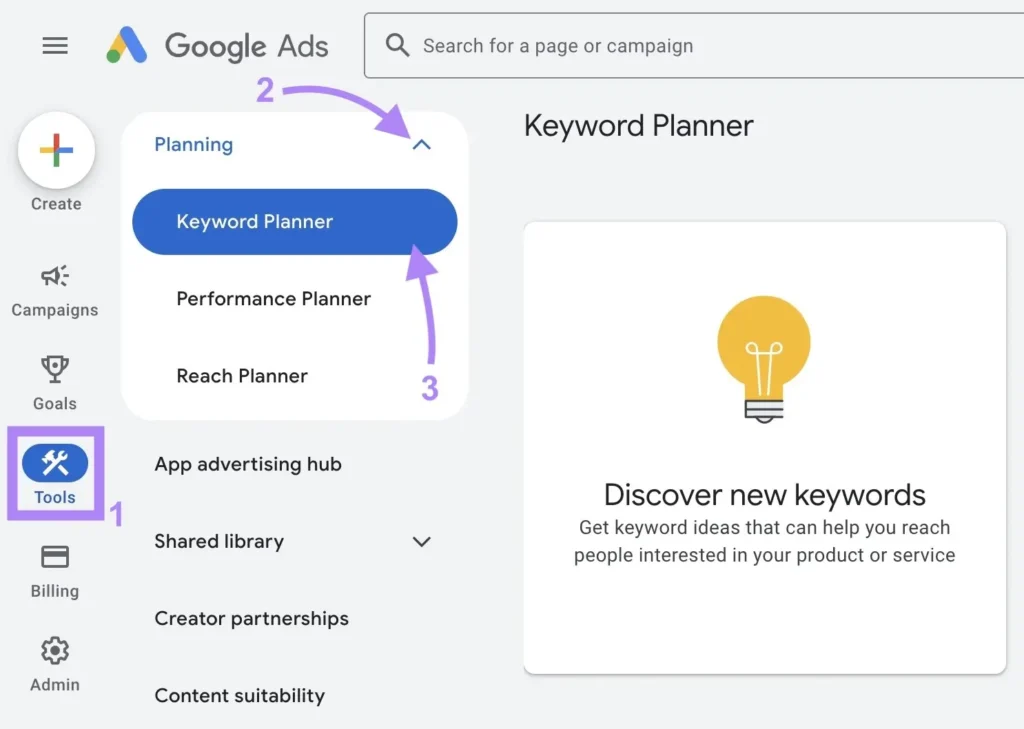
- Open Google Ads
- Navigate to Tools
- Select Keyword Planner
- Choose your preferred research option
You’ll see two primary features:
- Discover New Keywords
- Get Search Volume and Forecasts
Each serves a different purpose depending on your marketing goals.
Discover New Keyword Opportunities
One of the most useful features inside Google Keyword Planner is discovering fresh keyword ideas.
There are two ways to begin:
Start with Keywords
Simply enter one or more broad keywords related to your business.
For example, if you own a home cleaning company, you could enter:
- oven cleaning
- house cleaning
- kitchen cleaning
Google then generates hundreds of related searches based on real user behaviour.
Instead of guessing what your audience searches for, you receive keyword suggestions backed by actual search activity.
Start with a Website
Another powerful option is analysing a website.
You can enter:
- Your own website
- A competitor’s website
Google scans the pages and identifies keyword opportunities based on the site’s content.
This method often uncovers keywords you may never have considered.
It’s particularly useful when entering an established competitor because you’ll quickly discover topics Google associates with their website.
Understand Search Volume
One of the first columns you’ll notice inside Google Keyword Planner is Average Monthly Searches.
This estimate shows how frequently users search for a keyword during an average month.
Generally:
- Higher search volume means greater traffic potential.
- Lower search volume usually indicates niche or highly specific topics.
However, bigger isn’t always better.
A keyword receiving 500 monthly searches may convert significantly better than one receiving 20,000 searches if it closely matches your service.
Always focus on relevance rather than simply chasing high-volume keywords.
Look Beyond Search Volume
Many beginners only consider search volume.
Professional marketers evaluate multiple metrics together.
When analysing keywords, consider:
- Search intent
- Competition
- CPC
- Seasonal demand
- Relevance
- Business value
A keyword with moderate searches and low competition often delivers stronger long-term SEO results than an extremely competitive phrase.
Filter Keywords for Better Results
Without filters, you’ll often receive thousands of keyword suggestions.
Fortunately, Google Keyword Planner allows you to narrow your results.
Useful filters include:
- Competition level
- Search volume
- Keyword text
- Location
- Language
- Excluded terms
For example, if you sell premium leather handbags, you can exclude keywords containing:
- fake
- synthetic
- replica
- DIY
Removing irrelevant searches helps you focus only on keywords likely to generate valuable traffic.
Analyse Keyword Competition
Keyword competition is especially important for advertisers.
Inside Google Keyword Planner, you’ll usually see:
- Low
- Medium
- High
These competition levels indicate advertiser demand rather than SEO difficulty.
High competition generally means many businesses are bidding on the keyword, often because it converts well.
While this doesn’t directly measure organic ranking difficulty, it still provides valuable insight into commercial value.
Understand CPC Data
Another valuable metric is Cost Per Click (CPC).
You’ll often see:
- Low range bid
- High range bid
These estimates indicate what advertisers typically pay for a click.
Higher CPC usually suggests:
- Strong commercial intent
- Better conversion potential
- Higher customer value
For example:
“Best laptops”
may have lower CPC than
“Buy business laptop online”
because the second search shows much stronger purchase intent.
This information helps both advertisers and SEO professionals prioritise valuable keywords.
Find Long-Tail Keywords
One of the smartest SEO strategies is targeting long-tail keywords.
These are longer, more specific search phrases.
Examples include:
Instead of:
- oven cleaning
Use:
- professional oven cleaning service
- oven cleaning near me
- eco-friendly oven cleaning service
- affordable oven cleaning company
Long-tail keywords usually have:
- Less competition
- Higher conversion rates
- More targeted visitors
- Easier ranking opportunities
Google Keyword Planner makes discovering these phrases much easier.
Use Keyword Groups
Rather than targeting individual keywords randomly, organise related keywords into topic clusters.
For example:
Main topic:
Kitchen Cleaning
Supporting keywords:
- oven cleaning
- cooker cleaning
- extractor fan cleaning
- hob cleaning
- kitchen appliance cleaning
This structure improves both SEO and website organisation.
Search engines increasingly reward websites that comprehensively cover a topic.
Research Competitor Keywords
Competitor analysis remains one of the fastest ways to build an effective keyword strategy.
Using Google Keyword Planner, you can:
- Analyse competitor websites
- Discover keyword opportunities
- Find missing topics
- Generate new content ideas
If several competitors consistently target similar keywords, they’re probably valuable within your industry.
Rather than copying content, create more comprehensive, helpful pages around those topics.
Use Forecasting for PPC Campaigns
If you’re planning Google Ads campaigns, forecasting is one of the most valuable features inside Google Keyword Planner.
Simply upload your chosen keywords.
The planner estimates:
- Expected clicks
- Impressions
- Advertising cost
- Average CPC
- Potential conversions
Although forecasts aren’t guaranteed, they provide useful benchmarks before investing your advertising budget.
You can also adjust:
- Daily budget
- Maximum bid
- Match type
This allows you to compare different advertising scenarios before launching campaigns.
Choose Keywords Based on Search Intent
Understanding user intent is just as important as search volume.
Most searches fall into four categories.
Informational
Users want answers.
Examples:
- how to clean an oven
- what is keyword research
Navigational
Users already know where they want to go.
Examples:
- Google Ads login
- Google Keyword Planner
Commercial
Users are researching products or services.
Examples:
- best oven cleaning service
- top keyword research tools
Transactional
Users are ready to buy.
Examples:
- hire oven cleaner
- buy keyword research software
Matching your content to the correct search intent significantly improves rankings and conversions.
Common Mistakes to Avoid
Many beginners misuse Google Keyword Planner by making avoidable mistakes.
Some of the most common include:
Ignoring long-tail keywords
Only targeting high-volume searches
Choosing keywords without understanding user intent
Not filtering irrelevant suggestions
Ignoring local search opportunities
Failing to monitor changing search trends
Successful keyword research requires quality over quantity.
A carefully selected list of relevant keywords often outperforms hundreds of random phrases.
Combine Keyword Planner with Other SEO Research
Although Google Keyword Planner is extremely useful, many SEO professionals combine it with additional research methods.
Consider checking:
- Google Search Console
- Google Trends
- Competitor websites
- Customer FAQs
- Industry forums
- Related Google searches
This broader approach uncovers opportunities that keyword tools alone may overlook.
Tips for Better Results
To get the most from Google Keyword Planner, follow these best practices:
- Start with broad industry keywords.
- Explore multiple keyword variations.
- Filter out irrelevant suggestions.
- Prioritise keywords with clear search intent.
- Compare search volume against competition.
- Build topic clusters instead of isolated pages.
- Review keyword trends regularly.
- Update your keyword strategy as search behaviour changes.
Consistent research leads to stronger SEO performance over time.
Is Google Keyword Planner Enough for SEO?
For many beginners, Google Keyword Planner provides an excellent foundation.
It helps you understand what people search for and which keywords advertisers value most.
However, SEO involves much more than keyword research.
You’ll also need:
- High-quality content
- Strong internal linking
- Technical SEO
- Page speed optimisation
- User experience improvements
- Quality backlinks
Keyword research opens the door, but excellent content is what ultimately earns rankings.
Final Thoughts
Learning to use Google Keyword Planner effectively can transform the way you approach SEO and paid advertising. Instead of creating content based on assumptions, you’ll be making decisions using real search data from Google itself.
From discovering new keyword opportunities and analysing search demand to understanding competition and forecasting campaign performance, Google Keyword Planner offers valuable insights for marketers of every experience level.
The key is not simply collecting hundreds of keywords but identifying the terms that genuinely match your audience’s needs and your business goals. Combine thoughtful keyword research with well-written, user-focused content, and you’ll be in a far stronger position to improve your visibility in both organic search results and Google Ads.
As search behaviour continues to evolve, regularly revisiting Google Keyword Planner and refining your keyword strategy will help you stay ahead of competitors and ensure your content remains relevant. Whether you’re building a new website, growing a blog, or managing advertising campaigns, mastering Google Keyword Planner is a skill that delivers long-term value for any digital marketing strategy.