
In the world of SEO, one small technical mistake can quietly damage your rankings—and duplicate content is one of the most common culprits. Whether it’s different URL versions, tracking parameters, or pagination issues, search engines can easily get confused about which page to rank.
That’s where canonical URLs come in.
In this guide, we’ll break down canonical URLs in a simple, human-friendly way. You’ll learn how they work, why they matter, common problems, and how to fix them properly—without getting lost in technical jargon.
What Is a Canonical URL?
A canonical URL is simply the main version of a webpage that you want search engines to index and display in search results.
Let’s say your website has multiple URLs showing the same content:
To a user, these might look the same. But to search engines, they are different pages.
A canonical URL tells search engines:
👉 “This is the original page—ignore the others.”
Why Canonical URLs Matter for SEO
If you don’t manage duplicate URLs properly, your SEO performance can suffer in several ways.
1. Prevents Duplicate Content Issues
Search engines don’t want to show identical pages in results. If multiple versions exist, they must choose one—which may not be the one you prefer.
Canonical tags guide that decision.
2. Consolidates Link Equity
Imagine different websites linking to different versions of your page. Without canonicalisation, that authority is split.
With a proper canonical setup, all link value is combined into a single URL, making it stronger.
3. Improves Crawl Efficiency
Search engines allocate limited resources (crawl budget). If they waste time crawling duplicate pages, your important pages may get less attention.
Canonical tags help them focus on what matters.
4. Keeps Analytics Clean
Duplicate URLs can fragment your traffic data. Canonical URLs ensure everything is tracked under one version, giving you clearer insights.
How Canonical Tags Work
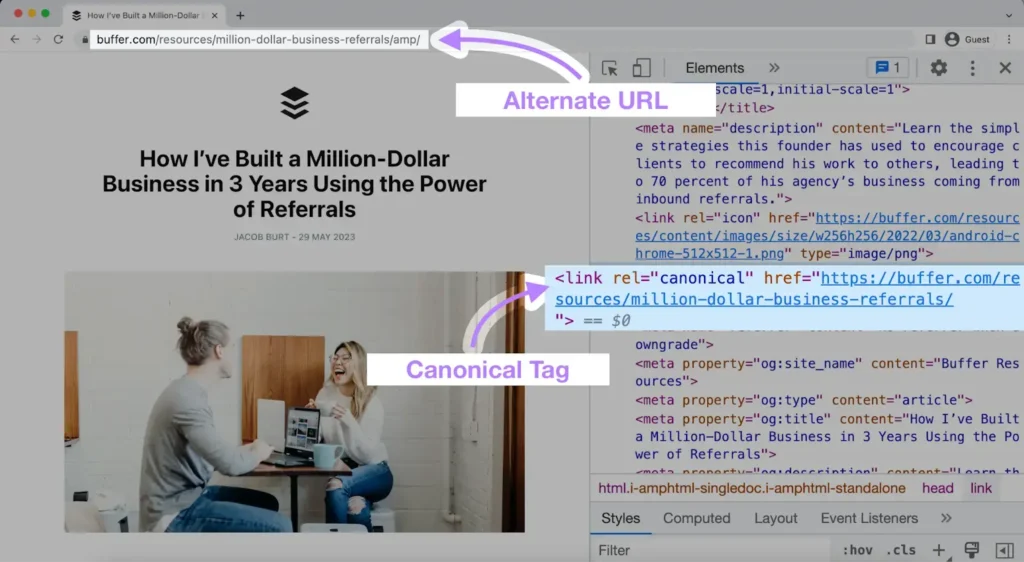
A canonical tag is a small piece of HTML code placed inside the <head> section of a webpage:
<link rel="canonical" href="https://example.com/preferred-page/" />
This tag tells search engines:
👉 “Even if this page exists in multiple forms, this is the one you should rank.”
Self-Referencing Canonicals (Very Important)
Even if your page doesn’t have duplicates, you should still include a canonical tag pointing to itself.
Example:
<link rel="canonical" href="https://example.com/blog/" />
Why? Because it removes ambiguity and strengthens your SEO signals.
Common Causes of Duplicate URLs
Many websites unknowingly create duplicate pages. Here are the most common reasons:
1. HTTP vs HTTPS
Search engines treat these as different pages.
2. WWW vs Non-WWW
Consistency is key—you must choose one version.
3. URL Parameters
- example.com/product
- example.com/product?utm_source=google
These are often created by marketing campaigns.
4. Trailing Slashes
- example.com/page
- example.com/page/
Even this small difference matters.
5. Pagination
- example.com/blog
- example.com/blog?page=2
These pages often contain similar content.
6. Filters & Sorting
- example.com/shoes
- example.com/shoes?sort=price
These variations can quickly multiply.
Best Practices for Using Canonical URLs
To get the most benefit, follow these proven best practices:
✔ Always Use Absolute URLs
Correct:
<link rel="canonical" href="https://example.com/page/" />
Incorrect:
<link rel="canonical" href="/page/" />
Absolute URLs remove confusion.
✔ Use Only One Canonical Per Page
Multiple canonical tags create conflicting signals, and search engines may ignore them completely.
✔ Keep Signals Consistent
Your canonical URL should match:
- Sitemap URLs
- Internal links
- Redirect targets
Consistency strengthens trust.
✔ Use HTTPS Everywhere
If your website is secure (which it should be), your canonical URLs must also use HTTPS.
✔ Maintain URL Structure Consistency
Stick to:
- Either www or non-www
- Either with slash or without slash
Mixing them creates duplication.
When to Use Canonical Tags vs Redirects
This is where many people get confused.
Use Canonical Tags When:
- You need multiple versions to stay live (e.g., filtered pages)
- Content is similar but still useful for users
Use Redirects When:
- A page is permanently moved
- Duplicate pages are no longer needed
Example: Redirect HTTP → HTTPS
Redirects are stronger signals than canonical tags because they completely remove duplicate versions.
Common Canonical Mistakes to Avoid
Even small errors can break your SEO. Here are the most frequent issues:
❌ Pointing to Redirected URLs
If your canonical points to a page that redirects, it creates confusion.
Always point directly to the final destination.
❌ Using Canonicals for Different Content
Canonical tags should only be used for duplicate or very similar pages.
Don’t use them to merge unrelated content—it won’t work.
❌ Placing Canonical Tags Outside <head>
Search engines only recognise canonical tags in the <head> section.
❌ Conflicting Signals
If your:
- Canonical tag says one thing
- Redirect says another
- Sitemap shows something else
Search engines will ignore all of them and decide on their own.
Canonical Tags and International SEO
If your site targets multiple languages or regions, things become more complex.
You must use canonical tags along with hreflang tags correctly.
Each language version should:
- Have its own canonical URL
- Reference alternate language versions
Incorrect setup can cause the wrong language page to rank.
How to Audit Canonical URLs
Regular audits are essential to keep your site healthy.
Method 1: Google Search Console
Use the URL Inspection tool:
- Enter your page URL
- Check “Google-selected canonical”
- Compare it with your preferred version
If they don’t match, something is wrong.
Method 2: SEO Tools
Tools like site audit crawlers can detect:
- Missing canonical tags
- Duplicate pages
- Broken canonical links
- Multiple canonical tags
This saves time compared to manual checking.
Advanced Canonicalisation Methods
Besides HTML tags, there are other ways to define canonical URLs:
1. HTTP Headers
Useful for non-HTML files like PDFs.
2. XML Sitemaps
Only include canonical URLs in your sitemap.
3. Internal Linking
Always link to your preferred URL version within your site.
Real-World Example
Let’s say you run an eCommerce site.
You have:
- example.com/shoes
- example.com/shoes?colour=black
- example.com/shoes?sort=price
Instead of letting all pages compete:
👉 Set canonical to:
example.com/shoes
This ensures:
- Better rankings
- Consolidated authority
- Cleaner indexing
Final Thoughts
Canonical URLs may seem like a small technical detail, but they play a big role in SEO success.
When implemented correctly, they:
- Prevent duplicate content issues
- Strengthen ranking signals
- Improve crawl efficiency
- Simplify data tracking
However, incorrect implementation can confuse search engines and harm your visibility.
The key is consistency. Align your canonical tags with redirects, sitemaps, and internal links—and always keep your site structure clean.